OnlineTutorialHub

Search This Blog

Theme images by Storman. Powered by Blogger.

About Fast Edition

Pages

Services

Blog Archive

Tuesday, 20 February 2018

HTML Elements | HTML Tags | Learn HTML | Nesting

- 1 comment

HTML Elements :-


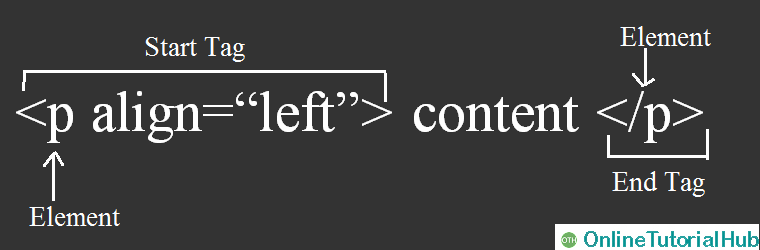
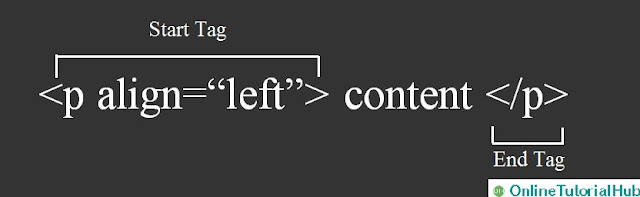
An HTML element consists of a start tag and end tag, with the content fill in between:


 Start Tag

                  Content

 End Tag

 <p>

           This is paragraph.

 </p>

 <h1>

            This is heading.

 </h1>

 <div>

            This is division.

 </div>


HTML elements with no content are called empty elements.

Empty elements do not have an end tag, such as the <br> element which represents a line break, <hr> element which represents a horizontal rule.

Empty elements are also known as void elements.

Difference between HTML Tag and HTML elements :-


HTML elements consist of a starting tag.

If the HTML element will hold sub content within it then it will end up with an ending tag.

For example
, <h1> is starting tag of a heading and </h1> is closing tag of the same heading but <h1> This is a heading </h1> is a heading element.

Nested HTML Elements :-

HTML Elements can be nested, we can write an element, before closing that element, we can start as well as finish another element within that outer element.
Example:

<!DOCTYPE html>
<html>
<head>
    

    <title>This is a example for Nested HTML Elements </title>
</head>
<body>
    <p>This is a <u>underlined</u> paragraph.</p>
</body>
</html>
This HTML document produces following output :       


Explanation of above example -

Here, <html> element defines the whole document. It has a start tag <html> and an end tag </html>. Here is also a <u>...</u> (underline) tag which is used to make a text underlined. Paragraph tag is a outer element and underline tag is an inner element which can be called as nesting of elements.

Heading Elements :-


Any HTML document starts with a heading. A HTML h tag can be defined as a title or a subtitle. In HTML, we can use different sizes for headings. HTML has six different heading tags which are defined as <h1>, <h2>, <h3>, <h4>, <h5>, and <h6>. Size of the text depends on the number of heading. h1 is the largest heading tag and h6 is the smallest one. 

Example –
<!DOCTYPE html>
<html>
<head>
      <title> Heading Example </title>
</head>
 <body>
      <h1>This is heading 1</h1>
      <h2>This is heading 2</h2>
<h3>This is heading 3</h3>
 <h4>This is heading 4</h4>
  <h5>This is heading 5</h5> 
  <h6>This is heading 6</h6>
</body>
</html>

This HTML document produces following output :   
    

Tuesday, 19 December 2017

Important Factors of RDBMS

- No comments

Introduction to RDBMS:-

  • RDBMS stands for Relational Database Management System.
  • RDBMS is based on Relational Model.
   RDBMS can be defined as Database Management System (DBMS) where all data visible to the user is organized strictly as tables.
  • Examples of RDBMS: SQL, Sybase, Oracle, Microsoft SQL Server, Ingress, DB2, MySQL, PostgreSQL.
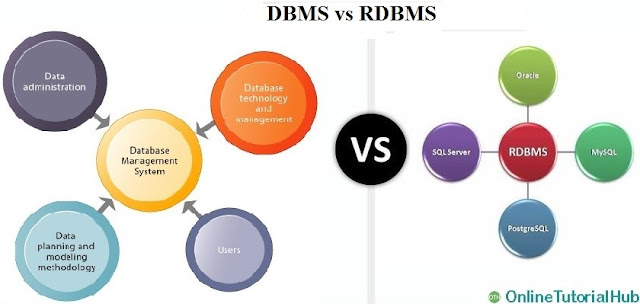
RDBMS vs DBMS

Why RDBMS is better than DBMS ?


The main differences between DBMS and RDBMS are given below:


S.NO.DBMSRDBMS
1DBMS stands for Database Management System.RDBMS stands for Relational Database Management System.
2DBMS offers an organized way of storing, managing and retrieving information.RDBMS provides all features of DBMS with an added referential integrity concept.
3In DBMS, data is stored as a file.In RDBMS, data are stored in a tabular form.
4In DBMS, there is no relationship concept.RDBMS is used to build up the relationship concept between two database objects, i.e., tables
5In DBMS, Normalization is not available.In RDBMS, Normalization is available.
6DBMS supports single user only.RDBMS supports multiple users.
7DBMS treats data as files internally.RDBMS treats data as tables internally.
8In DBMS, there is no security of data.In RDBMS, there are multiple levels of security, at logging level, at the command level, at the object level.
9DBMS does not support client-server architecture.RDBMS support client-server architecture.
10DBMS does not support distributed architecture.RDBMS support distributed architecture.
11DBMS supports 3 rules of E.F.CODD out of 12 rules.RDBMS supports minimum 6 rules of E.F.CODD out of 12 rules.
12In DBMS, ACID (Atomicity, Consistency, Isolation, and Durability) properties of the database must be implemented by the user or the developer.In RDBMS, ACID (Atomicity, Consistency, Isolation, and Durability) properties of the database are defined in the integrity constraints.
13DBMS does not impose integrity constraints.RDBMS impose the integrity constraints.
14DBMS has to provide some uniform methods to access the stored information.RDBMS system supports a tabular structure of the data and a relationship between them to access the stored information.
15DBMS requires low software and hardware requirements.RDBMS requires high software and hardware requirements.
16Examples of DBMS: file systems, XML, etc.Example of RDBMS: MySQL, Postgres, SQL Server, Oracle, etc.
Now, you can say that RDBMS is most secure and useful than DBMS.


Thursday, 30 November 2017

Top 15 differences between DBMS and RDBMS | Easy SQL

- 1 comment

Difference between DBMS (Database Management System) and RDBMS (Relational Database Management System):-


DBMS and RDBMS both are used to store information in the physical database but there are some notable differences between them.

onlinetutorialhub, DBMS, RDBMS, SQL


DBMS vs RDBMS:-

The main differences between DBMS and RDBMS are given below:

S.NO. DBMSRDBMS
1DBMS stands for Database Management System.RDBMS stands for Relational Database Management System.
2DBMS offers an organized way of storing, managing and retrieving information.RDBMS provides all features of DBMS with an added referential integrity concept.
3In DBMS, data is stored as a file.In RDBMS, data are stored in a tabular form.
4In DBMS, there is no relationship concept.RDBMS is used to build up the relationship concept between two database objects, i.e., tables
5In DBMS, Normalization is not available.In RDBMS, Normalization is available.
6DBMS supports single user only.RDBMS supports multiple users.
7DBMS treats data as files internally.RDBMS treats data as tables internally.
8In DBMS, there is no security of data.In RDBMS, there are multiple levels of security, at logging level, at the command level, at the object level.
9DBMS does not support client-server architecture.RDBMS support client-server architecture.
10DBMS does not support distributed architecture.RDBMS support distributed architecture.
11DBMS supports 3 rules of E.F.CODD out of 12 rules.RDBMS supports minimum 6 rules of E.F.CODD out of 12 rules.
12In DBMS, ACID (Atomicity, Consistency, Isolation, and Durability) properties of the database must be implemented by the user or the developer.In RDBMS, ACID (Atomicity, Consistency, Isolation, and Durability) properties of the database are defined in the integrity constraints.
13DBMS does not impose integrity constraints.RDBMS impose the integrity constraints.
14DBMS has to provide some uniform methods to access the stored information.RDBMS system supports a tabular structure of the data and a relationship between them toaccess the stored information.
15DBMS requires low software and hardware requirements.RDBMS requires high software and hardware requirements.
16Examples of DBMS: file systems, XML, etc.Example of RDBMS: MySQL, postgres, SQL Server, Oracle, etc.

Now, you can say that RDBMS is most secure and useful than DBMS.


Tags:- Difference b/w DBMS vs RDBMS, DBMS vs RDBMS, RDBMS vs DBMS, RDBMS, DBMS


Monday, 27 November 2017

What is BigData | BigData | BigData Hadoop

- 4 comments


What is BigData?


BigData is nothing, a huge amount of data which is coming from different sources like Social networking sites, E-commerce site,  Weather Station,  Telecom company and Share Market etc.
At the same time, BigData cannot be stored in any traditional system like Access, SQL & Oracle etc. BigData is being generated with such a high speed that's why BigData is a problem for traditional systems as these are not able to store & process BigData due to some limitations.

IBM suggested five V's to identify and understand the BigData if any data having characteristics of 5 V's then we can say this is BigData :  
1. Volume: The size of the data.
2. Variety: Processing different types of data.
3. Velocity: The speed at which data is generated.
4. Value: Finding correct meaning out of the data.
5. Veracity: The trustworthiness of the data in terms of accuracy.


The data will be of three types.
  • Structured data: Relational data.
  • Semi-Structured data: XML data.
  • Unstructured data: Word, PDF, Text, Media Logs. 

BigData Sources -


There may be many reasons behind the growth of Bigdata, but the main reason is the continuous enhancement of technology. If you go back in time like in the 70s or 80s only a few people were using computers. But now everyone owns a gadget, everyone has a mobile phone, everyone owns a laptop and they are generating data every day. Now you can also think of Internet of Things (IoT) as a factor.
Nowadays we're dealing with interconnected smart devices and smart appliances; they form a network of things which is nothing but the Internet of things. So these smart appliances are also generating data and one major factor behind the rise of BigData that comes to my mind is Social media.

Let's understand Bigdata with the help of some examples : 

Social Media :

We have billions of people on social media because of we human, we are social animals and we love to interact, we love to share our thoughts, feelings, and social media website provides us the platform that we need, and we have been using it extensively every day.

So if you look at the stats, you can see :

  •  In Facebook, the user generates almost 4 million likes in every 60 seconds.
  • On Twitter, there are almost 300 thousand tweets in every 60 seconds.
  • On Reddit, there are 18000 user cast votes in every 60 seconds
  • On Instagram more than 1 million likes in every 60 seconds
  • On YouTube, there are almost 300 hours of new videos uploaded in every 60 seconds.
Now, this is data for every 60 seconds. You can imagine the kind of data that we are dealing with every day and how much data we have collected throughout the years. Since the Social Media website has started now so a lot of data has been rising over years. 

Cisco :

Cisco is one of the biggest networking companies and they track the data traffic.
In 2015, if you see that Cisco was dealing with only 3.7 Exabyte’s ( 1 Exabyte = 10^18 bytes) and now in just 5 years it's going up to 30.6 Exabytes. Now, it can be more in the coming years because the data has been growing faster and we are dealing with a lot of data.

Cisco also mentioned the three major reasons behind the growth of the data :


1. The first one is the adoption of Smarter Mobile Devices than basic mobiles like Nokia 1100 which can be used only for calls and text messages. Nowadays everyone is using Smartphones and different apps on these Phones, each app generates a lot of data.

2. The next reason they mentioned is Cell Network, we have 2G, 3G, and 4G and now we're looking forward to 5G. Now we are advancing the Cellular Network Technology and it provided us feasible communication even faster and in a better way. Also, This gave us chance to share things that have become very easy for us to send a message or send videos to our loved ones in few seconds only.

3. The next reason as per Cisco is Reviewing Tiered Pricing. The network companies are also providing a lot of data plan that anyone can use. Unlimited data plans, share plans which are very reasonable for us that's why we have been using it extensively.

Almost everyone in the world uses a mobile phone now, stats also say that we have 217 new users in every 60 seconds.  So you can say that we are dealing with a lot of data and that is why name comes as BigData.


Saturday, 25 November 2017

All HTML Tags | Learn HTML | HTML Tutorial | Easy HTML

- No comments

HTML Tags:-


Onlinetutorialhub, HTML, HTML tags

Tag

Description

<!–…–>Defines a comment
<!DOCTYPE>Defines the document type
<a>Defines an anchor
<abbr>Defines an abbreviation
<acronym>Defines an acronym
<address>Defines contact information for the author/owner of a document
<applet>Deprecated. Defines an embedded applet
<area />Defines an area inside an image-map
<b>Defines bold text
<base />Specifies the base URL/target for all relative URLs in a document
<basefont />Deprecated. Specifies a default color, size, or font for all the text in a document
<bdo>Overrides the current text direction
<big>Defines big text
<blockquote>Defines a long quotation
<body>Defines the document’s body
<br />Defines a single line break
<button>Defines a clickable button
<caption>Defines a table caption
<center>Deprecated. Defines centered text
<cite>Defines a citation
<code>Defines a piece of computer code
<col />Defines attribute values for one or more columns in a table
<colgroup>Specifies a group of one or more columns in a table for formatting
<dd>Defines a description of an item in a definition list
<del>Defines text that has been deleted from a document
<dfn>Defines a definition term
<dir>Deprecated. Defines a directory list
<div>Defines a section in a document
<dl>Defines a definition list
<dt>Defines a term (an item) in a definition list
<em>Defines emphasized text
<fieldset>Groups related elements in a form
<font>Deprecated. Defines font, color, and size for text
<form>Defines an HTML form for user input
<frame />Defines a window (a frame) in a frameset
<frameset>Defines a set of frames
<h1> to <h6>Defines HTML headings
<head>Defines information about the document
<hr />Defines a horizontal line
<html>Defines the root of an HTML document
<i>Defines italic text
<iframe>Defines an inline frame
<img />Defines an image
<input />Defines an input control
<ins>Defines text that has been inserted into a document
<kbd>Defines keyboard input
<label>Defines a label for an <input> element
<legend>Defines a caption for a <fieldset> element
<li>Defines a list item
<link />Defines the relationship between a document and an external resource
<map>Defines a client-side image-map
<menu>Deprecated. Defines a menu list
<meta />Defines metadata about an HTML document
<noframes>Defines an alternate content for users that do not support frames
<noscript>Defines an alternate content for users that do not support client-side scripts
<object>Defines an embedded object
<ol>Defines an ordered list
<optgroup>Defines a group of related options in a drop-down list
<option>Defines an option in a drop-down list
<p>Defines a paragraph
<param />Defines a parameter for an object
<pre>Defines preformatted text
<q>Defines a short quotation
<s>Deprecated. Defines strikethrough text
<samp>Defines sample output from a computer program
<script>Defines a client-side script
<select>Defines a drop-down list
<small>Defines smaller text
<span>Defines a section in a document
<strike>Deprecated. Defines strikethrough text
<strong>Defines strong text
<style>Defines style information for a document
<sub>Defines subscripted text
<sup>Defines superscripted text
<table>Defines a table
<tbody>Groups the body content in a table
<td>Defines a cell in a table
<textarea>Defines a multiline input control (text area)
<tfoot>Groups the footer content in a table
<th>Defines a header cell in a table
<thead>Groups the header content in a table
<title>Defines a title for the document
<tr>Defines a row in a table
<tt>Defines teletype text
<u>Deprecated. Defines underlined text
<ul>Defines an unordered list
<var>Defines a variable
<xmp>Deprecated. Defines preformatted text


Friday, 24 November 2017

What is HTML Tags | Learn HTML | HTML Tutorial | Easy HTML

- 1 comment

HTML Tags:-

HTML tags are used to mark up the start and end of an HTML element. HTML tags are surrounded by the two characters < and >.These (< and >) characters are called angle brackets. A start tag consists of an opening angle bracket (<) followed by the element name, and a closing angle bracket (>). A start tag (<) is usually called opening tag and the end tag (>) is usually called closing tag. HTML tags are not case sensitive, <p> same as the <P>.
HTML tags consist three main parts –
  • Opening tag
  • Content
  • Closing tag
Onlinetutorialhub, HTML, HTML Tags

But some HTML tags are not closed tags. For example,
  • <br> : br tag is usually called break tag. br tag breaks the line of the code.
  • <hr> : hr tag is usually called horizontal rule. hr tag is used to put a line across the webpage.

Basic tags in HTML:-

Basic Tags are –
  • Heading tags
  • Paragraph tags
  • Line break tags etc.
1) Heading Tags:-
Any HTML document starts with a heading. A HTML h tag can be defined as a title or a subtitle. In HTML, we can use different sizes for headings. HTML has six different heading tags which are defined as <h1>, <h2>,<h3>, <h4>, <h5>, and <h6>. Size of the text depends on the number of heading. h1 is the largest heading tag and h6 is the smallest one.

Example -

<!DOCTYPE html>
<html>
<head>
<title>Heading Example</title>
</head>
<body>
<h1>This is heading 1</h1>
<h2>This is heading 2</h2>
<h3>This is heading 3</h3>
<h4>This is heading 4</h4>
<h5>This is heading 5</h5>
<h6>This is heading 6</h6>
</body>
</html>

This HTML document produce following output :

Onlinetutorialhub, HTML, HTML tags

2) Paragraph Tags:-
HTML paragraph or HTML p tag is used to define a paragraph in a webpage. The paragraph element begins with the HTML <p> tag and ends with the HTML </p> tag.
Note : Browser itself add an empty line before and after a paragraph.

Example –

<!DOCTYPE html>
<html>
<head>
<title>Paragraph Example</title>
</head>
<body>
<p>First paragraph of HTML.</p>
<h2>Second paragraph of HTML.</h2>
<h3>Third paragraph of HTML.</h3>
</body>
</html>

This HTML document produce following output :

Onlinetutorialhub, HTML, HTML tags

3) Line Break Tags:-
The HTML <br> tag produces a line break in text. br tag is useful for writing a poem or an address, where the division of lines is necessary. br tag must have a start tag, and must not have an end tag. br tag is also known as empty tag. In HTML, we can use br tag two ways: <br> or <br/>. It is recommended to use <br/> tag because it is supported in HTML and XHTML both.

Example –

<!DOCTYPE html>
<html>
<head>
<title>Line Break Example</title>
</head>
<body>
<p>If you want to break line</p>
in a paragraph,<br/>
use the br tag</p>
</body>
</html>

This HTML document produce following output :

Onlinetutorialhub, HTML, HTML tags


Wednesday, 15 November 2017

Python # 7 - Python Examples

- 1 comment

Python Examples:-
Python code straightforward and simple to run. Here is a basic Python code that will print "Welcome to Python".
Python examples are given below.
Example 1:
>>> a="Welcome To Python"
>>> print a

Output-
Welcome To Python

OnlineTutorialHub, OTH, Python, Python Examples

Explanation:
  • We are using IDLE to write the Python code. Detail clarification to run code in IDLE is given in my previous post (Execution of Python).
  • A variable is defined named "a" which holds "Welcome To Python".
  • "print" statement is used to print the content. subsequently "print a" statement will print the content of the variable. In this way, the output "Welcome To Python" is produced.
Python 3.6.2 Example-
In python 3x versions, you need to add parenthesis () in a string code to print it.

Example 2:
1)  Python program to add two numbers -

Code :
>>> num1 = 2.5
>>> num2 = 6.5
# Add two numbers
>>> sum = num1 + num2
# Display the sum
>>> print ( sum )

Output–
9.0

OnlineTutorialHub, OTH, Python, Python Examples


2)  Python program to add two numbers -

Code :
# Store input numbers >>> num1 = input ('Enter first number: ')
>>> num2 = input ('Enter second number: ')
# Add two numbers
>>> sum = float (num1) + float (num2)
# Display the sum
>>> print ('Sum of {0} and {1} is {2}'.format (num1, num2, sum))

Output–
Enter first number: 7.6
Enter second number: 3.5
The sum of 7.6 and 3.5 is 11.1

OnlineTutorialHub, OTH, Python, Python Examples
Explanation :
  • In this program, we requested that user to enter two numbers and this program displays the sum of two numbers entered by user.
  • We use the built-in function input() to take the input. input() returns a string, so we convert it into number using the float() function.


Sunday, 12 November 2017

Python # 6 - Execution of Python

- No comments

Execution of Python:-
After Python Installation and Environment Setup , the python interpreter lives in the installed directory.
By default it is /usr/local/bin/pythonX in Linux/Unix and C:\PythonX in Windows, where the 'X' denotes the version number.

There are three different ways to work in Python:
1) Interactive Mode::-
To invoke the Python interpreter in intermediate mode, we need to type “Python” in command line then we can directly enter “Python expressions” and press enter to get the output.

     >>>


“>>>” is the Python prompt. It denotes that Python interpreter is ready for input.
Example : Type 1 + 1 and press enter, We will get 2 as output.
To exit this mode type exit() or quit() and press enter.

OnlineTutorialHub, OTH, Python, Python Execution

2) Script Mode::-
This mode is used to run Python Scripts. And Scripts are nothing but simply written Python program in a file (notepad or notepad++ etc). Extension to save Python Scripts is “.py” i.e. the file having python program should be saved with “.py” then only it turns into Python Script and executable for script mode. We can save these scripts for future use.
For example: helloPython.py
We will write Python code in a separate file using any editor like notepad or notepad++ etc.

OnlineTutorialHub, OTH, Python, Python Execution

Save it by .py extension.

OnlineTutorialHub, OTH, Python, Python Execution

Here helloPython.py is ready to execute in Script Mode.
Now open Command prompt and execute it :
First we need to open command prompt and write directory/path/location where you have save this “.py” file and press enter.

OnlineTutorialHub, OTH, Python, Python Execution

Then write python helloPython.py at the command prompt.

OnlineTutorialHub, OTH, Python, Python Execution


OnlineTutorialHub, OTH, Python, Python Execution

3) Integrated Development Environment (IDE/IDLE):-
IDLE is a graphical user interface (GUI Software) that can be installed along with the Python programming language and is available from the official website .

IDLE provides useful features like code hinting, syntax highlighting and checking, file explorers etc. to the programmer/developer for application development.

By using an IDLE we can get rid of redundant tasks and significantly decrease the time required for application development, using an IDLE can make our life a lot easier.

Any Text Editing Software can be used to write a Python script file. We just need to save the file with the .py extension.

Click on Start button -> All Programs -> Python -> IDLE (Python GUI)

Console/Window opened by IDLE is called Python Shell/Python Prompt.

You can use both “Interactive” as well as “Script mode” in IDLE.

1) Using Interactive mode:
There is no need to save Python Code/Python Script in this mode of IDLE. We can directly write “Python Expressions” on Python Shell/Python Prompt and it will display result simultaneously when you hit enter key.

OnlineTutorialHub, OTH, Python, Python Execution

2) Using Script mode:
i)  Click on Start button -> All Programs -> Python -> IDLE (Python GUI)

ii)  Python Shell will be opened. Now click on File -> New Window.

A new Editor will be opened. Write your Python code here.

OnlineTutorialHub, OTH, Python, Python Execution

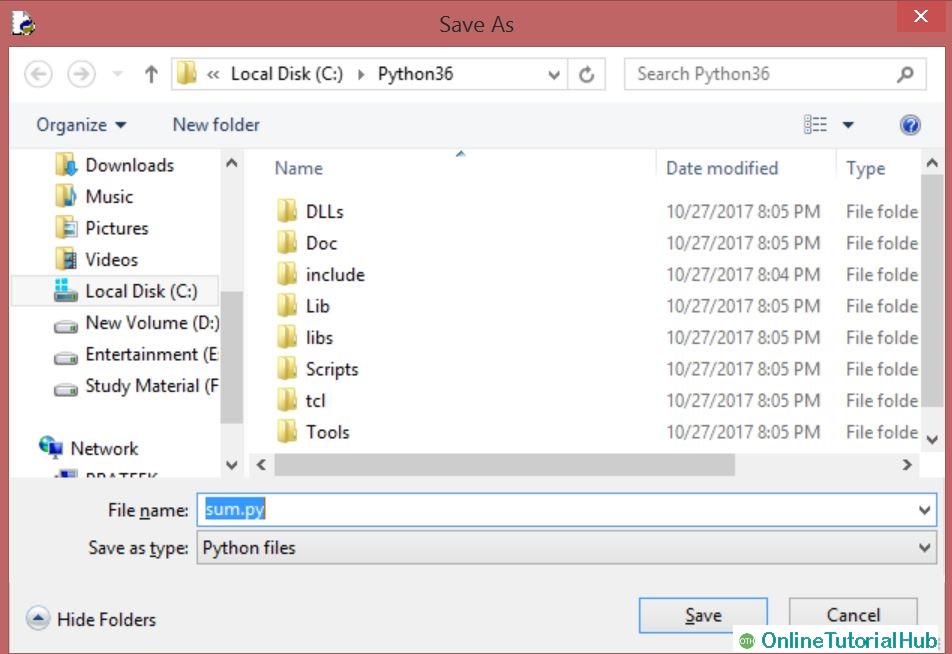
Click on file -> save as (sum.py)

OnlineTutorialHub, OTH, Python, Python Execution

Run then code by clicking on Run in the Menu bar.
Run -> Run Module

OnlineTutorialHub, OTH, Python, Python Execution

Result will be displayed on a new Python shell as:

OnlineTutorialHub, OTH, Python, Python Execution